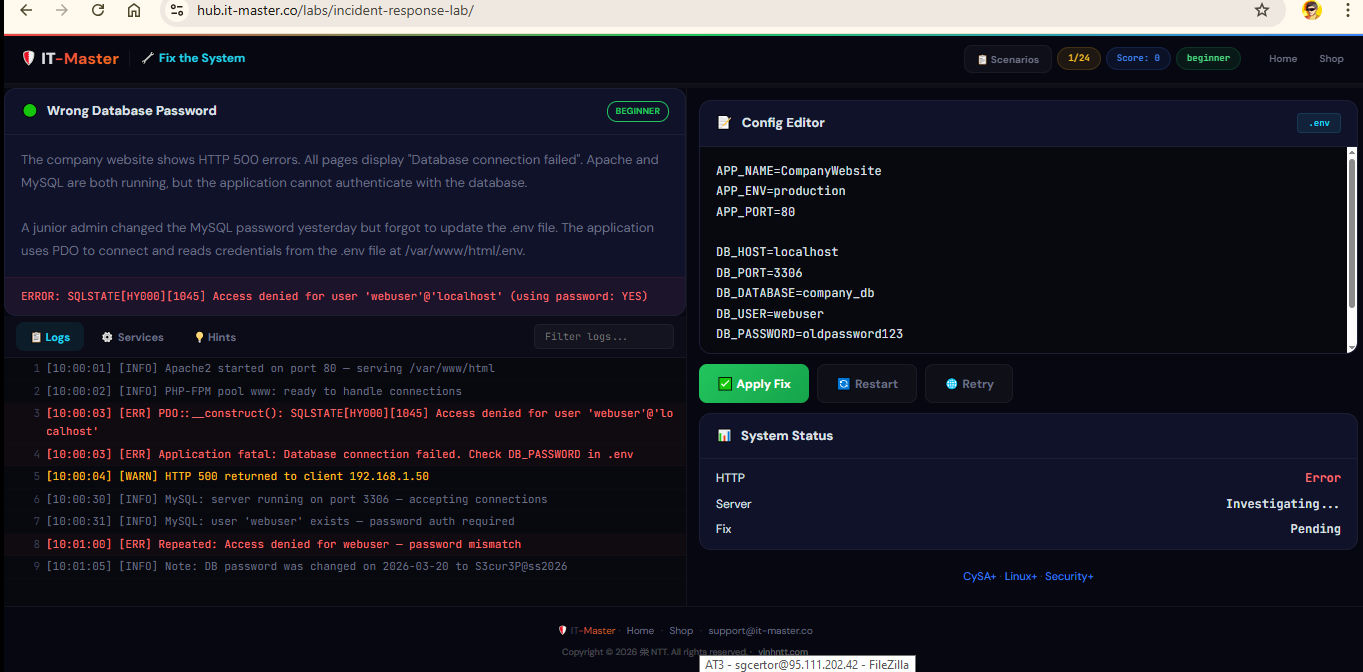
If you have ever sat through a CySA+ or CHFI study session and thought “I understand the theory, but I have never actually triaged a 502 Bad Gateway at 3 AM” — this lab was built for you. The IT-Master Incident Response Lab is a free, browser-based incident response simulator created by IT-Master VINH NTT to help certification candidates and junior blue teamers turn passive reading into active reps.
No installation. No virtual machine. No Docker. Open the page, and you are dropped into a broken production system with logs streaming, services failing, and a config editor waiting for your fix.
Try it now → IT-Master Incident Response Lab
What Is the IT-Master Incident Response Lab?
It is a single-page web application that simulates 24 distinct production incidents — the kind of broken-system tickets a SOC analyst, junior sysadmin, or DFIR responder actually closes during a normal week. Each scenario gives you:
- A short incident description (what the user reported, what changed)
- A realistic alert message (the same kind of error string you would grep out of
/var/log/syslog) - A live log viewer with timestamped, color-coded entries (info, warn, err) and a search filter — exactly how you would triage in a real SIEM
- A services panel showing which daemons are running or stopped, with start/stop buttons
- A multi-tab config editor containing the actual files you need to inspect and edit (
.env,nginx.conf,sshd_config,docker-compose.yml,/etc/resolv.conf, and more) - A progressive hints system — five hints per scenario, each costing 3 points, so you are rewarded for solving without help
- An Apply Fix button that validates your changes against the actual root cause
When you get it right, the HTTP status flips from 500 to 200, the system status panel shows ✅ FIXED, and you earn 10–25 points depending on difficulty. When you get it wrong, you stay in the trenches and keep digging.
Who Is This For?
This lab is purpose-built for three audiences:
CySA+ candidates preparing for the CompTIA Cybersecurity Analyst exam. The CS0-003 objectives spend a huge amount of time on log analysis, incident response procedures, vulnerability mitigation (Log4Shell, supply chain attacks, brute force), and triage workflows. Every one of those domains has at least one scenario in this lab. If you are studying CySA+, you can go directly to the IT-Master CySA+ resources for courseware and pair it with this simulator for the practical side.
CHFI candidates preparing for the EC-Council Computer Hacking Forensic Investigator exam. CHFI is heavy on log examination, evidence preservation, and reconstructing what happened from artifacts. The lab’s misleading-logs and full-stack-debugging scenarios train exactly the critical-thinking muscles CHFI tests — can you tell the difference between a symptom and a root cause when the logs are lying to you?
Junior SOC analysts, sysadmins, and DevOps engineers who want to build the reflexes for on-call. The lab is also genuinely useful for anyone who has a homelab but does not want to spend a Saturday rebuilding a broken VM just to practice one fix.
Why a Browser-Based Lab Beats a Traditional VM for Studying
Most cybersecurity labs ask you to download a 4 GB OVA, import it into VirtualBox, configure NAT, troubleshoot why your laptop fans are screaming, and then start studying. By the time you have a working environment, your study session is over.
The IT-Master Incident Response Lab is intentionally the opposite:
- Zero install. It is HTML, CSS, and JavaScript. Open the link, the lab runs.
- Zero state. Refresh the page and the scenario resets clean — no leftover configs, no broken networking.
- Works on anything. Chromebook, locked-down work laptop, phone in a coffee shop, a borrowed library PC. If it has a browser, it runs the lab.
- Repeatable. You can re-do scenario #17 (Log4Shell mitigation) ten times in twenty minutes. Try that with a 4 GB Kali VM.
- Focused. Every scenario isolates one or two concepts. You are not fighting the environment, you are practicing the skill.
This is the same reason flashcards beat textbooks for spaced repetition — frictionless reps win.
What Kind of Scenarios Are Inside?
The 24 scenarios are organized into four difficulty tiers, each rewarding more points and demanding more layers of thinking. A few examples to give you a feel:
🟢 Beginner — building the basic reflexes (10 points each)
Scenario 1 — Wrong Database Password. A junior admin rotated the MySQL password yesterday and forgot to update .env. The site is throwing HTTP 500. You get the SQLSTATE[HY000][1045] Access denied alert and the logs literally tell you the new password. Your job: open the .env file in the editor, fix DB_PASSWORD, hit Apply Fix. This is the lab teaching you to read the error before guessing.
Scenario 5 — DNS Resolution Failure. All external API calls are dying. dig @8.8.8.8 works but dig @10.0.0.99 times out. The decommissioned internal DNS is still in /etc/resolv.conf. Trains the muscle of separating “the internet is down” from “DNS is misconfigured.”
🟡 Intermediate — connecting two layers (15 points each)
Scenario 8 — Disk Full, MySQL Crashing. MySQL keeps dying. The naive fix is “restart MySQL.” The real fix involves finding what is filling the disk, rotating logs, and freeing space before the service can come back. Classic CySA+ triage.
Scenario 9 — SSL Certificate Expired. Browsers throw NET::ERR_CERT_DATE_INVALID. You learn the actual mitigation flow: identify the expired cert, replace it, reload the web server, verify with the system status panel.
🔴 Advanced — full incident response (20 points each)
Scenario 13 — Brute Force, Account Lockout. Hundreds of failed SSH logins from a single IP, the legit admin is now locked out, and you need to (a) block the attacker, (b) unlock the account, and (c) harden the config. This maps directly to CySA+ incident response and CHFI investigation chains.
Scenario 17 — Log4Shell Vulnerability Mitigation. A real-world CVE walkthrough. You add the JVM flag, upgrade the dependency, and verify the system is patched. CySA+ candidates should run this one twice.
Scenario 20 — Kubernetes Pod CrashLoopBackOff. Welcome to modern infrastructure. You read pod events, edit the deployment manifest, and bring the cluster back to healthy.
🟣 Expert — the way real incidents actually arrive (25 points each)
Scenario 21 — Misleading Logs, DNS Not Database. The logs scream “database error” but the database is fine. The actual problem is DNS. This is the single most important skill the lab teaches: the loudest error is rarely the root cause. If you can solve this one without hints, you are thinking like a senior responder.
Scenario 23 — Supply Chain Attack via Typosquatted Package. A postinstall script in a fake event-stream-utils package is exfiltrating environment variables to an attacker domain. You remove the package, rotate every secret it touched, and audit the rest of node_modules. This is precisely the CHFI-style chain-of-custody thinking the exam wants to see.
Scenario 24 — Full-Stack Debugging, 3 Hidden Issues. No single fix works. You must find and correct three separate root causes across nginx.conf, .env, and docker-compose.yml. This is what real outages look like.
How to Actually Study With It
Here is the workflow that gets the most learning out of a 30-minute session:
- Pick a scenario you have not solved. Open the Scenarios menu (top bar) and choose one. Solved ones are marked with ✅.
- Read the description and alert first — do not look at the logs yet. Form a hypothesis. What is your gut telling you the problem is? This is the diagnostic muscle CySA+ tests.
- Then open the Logs tab and search. Use the filter box like you would use a SIEM query. Confirm or reject your hypothesis with evidence.
- Check Services if relevant. Is the daemon even running? Many real incidents are this boring.
- Open the Config Editor and make the change. The lab supports multiple config files per scenario — switch tabs to inspect them all.
- Hit Apply Fix. Validate. If it fails, do not immediately reveal a hint. Re-read the logs. Hints cost 3 points each, and the score is how you measure your own progress.
- After solving, read the “Fix” explanation. It tells you the root cause and the prevention pattern — which is exactly the kind of post-incident lesson CySA+ asks about.
For CySA+ exam prep specifically: do scenarios 1–12 in your first week, 13–20 in your second, and the four expert scenarios as your final pre-exam stress test. Time yourself. The exam rewards speed.
For CHFI prep: focus on scenarios 13, 17, 21, and 23 — the ones that involve evidence, attribution, and reconstructing an attacker timeline.
Why It Helps More Than Watching Another YouTube Video
Reading or watching cybersecurity content is mostly recognition learning — you nod along, it feels familiar, and then you freeze on the exam because nothing in your brain has been forced to produce an answer under constraint.
This lab is recall and production learning. It hands you a broken system and a blinking cursor. You either fix it or you do not. That gap between “I read about it” and “I solved it” is exactly the gap CySA+ and CHFI exams probe — and exactly the gap that closes every NDA-bound incident at 2 AM.
Try It Now (and Where to Go Next)
The lab is free and runs entirely in your browser. No signup, no telemetry, no tutorial gating.
🔧 Run the lab → hub.it-master.co/labs/incident-response-lab
If you find this useful and you are working toward CySA+, the matching courseware, study guides, and practice tests are all curated at IT-Master’s CySA+ catalog. Pair the simulator with the courseware and you will have both the theoretical scaffolding and the muscle memory the exam expects.
The lab — and the broader IT-Master ecosystem of hands-on cybersecurity training — is built and maintained by VINH NTT, an IT-Master with two decades in the field who builds the kind of practical study tools he wishes he had when he was the one cramming for certs. Connect with him on LinkedIn if you want to follow along as more labs ship.
Now go fix scenario 1. The site is down.